Online Family Tree Mistakes That Wreck Your Research
*This post may have affiliate links, which means I may receive commissions if you choose to purchase through links I provide (at no extra cost to you). All opinions remain my own.
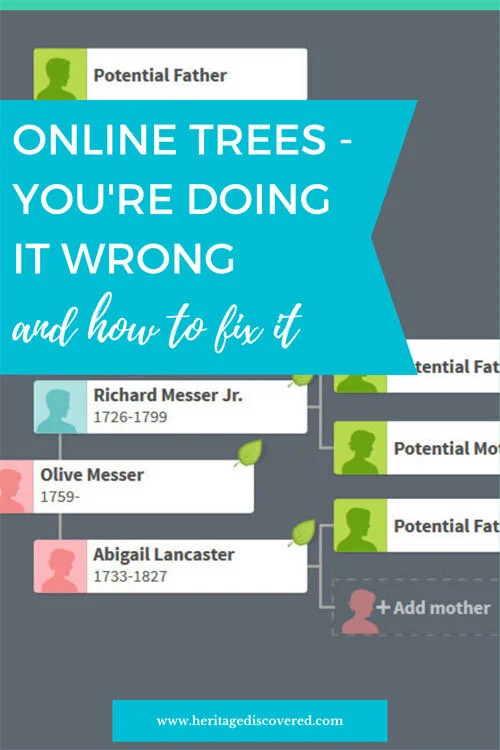
Online family trees can be a fabulous tool in your genealogy toolkit. They can also be a trap that steers you in the wrong direction.
One of the biggest online family tree mistakes I see is people copying online family trees without checking if the information is correct.
It’s easy to do. The work looks done for you. But has it really?
I’m Jessica, the professional genealogist behind Heritage Discovered. I help people move forward with their family history research when they’re stuck, overwhelmed, or short on time. If you want help sorting out a messy tree, verifying a line, or building a plan you can trust, you can browse my services and reach out.
Here’s how I use online family trees the right way, with practical family tree tips you can start using today.
Are Online Family Trees Accurate?
Sometimes, yes. A lot of times, no.
When you come across an online family tree that looks like it matches your family, it can be really tempting to copy it. But copying is one of the quickest ways to create problems in your genealogy research.
This applies whether you’re using online family trees on Ancestry, FamilySearch, MyHeritage, or a personal website. These sites can be helpful, but you still have to treat trees as hints, not proof. Think of this as one of the most important ancestry tips I can share.
Why online family trees can go wrong
Here’s what I see most often:
Trees without sources (especially for the facts you most want to know)
“Facts” like birthplaces and parents added with nothing to back them up
Sources that do not support the claim (like using a census as proof of a hometown)
The same incorrect information repeated across multiple trees because people copied each other
If you look closely, you’ll often notice a pattern. Several trees have the same wrong details and the “sources” are just other trees.
The real risk of copying
The main issue is what happens later.
If you copy incorrect information, you can end up researching the wrong people. Then, once you realize it’s wrong, you might need to start from scratch. I’ve had genealogy buddies tell me they scrapped entire trees because they could not untangle the errors.
Even if you could fix everything, it would not be a fun project to clean up years of shaky work.
So yes, use online family trees. Just use them carefully.
Related posts:
6 Common Genealogy Mistakes And How To Avoid Them
Solve Your Genealogy Brick Wall: How To Research A Last Name In An Area
Solve Your Genealogy Brick Wall: Review and Analyze Your Research
Solve Your Genealogy Brick Wall: 10 Ways To Widen Your Research Net
How to Use Online Family Trees the Right Way
Online family trees are a fantastic place to find clues, but I follow a few best practices so I do not introduce errors into my research. These are my go-to family tree tips when I’m about to look up a family tree of someone else.
1. Check for Consistency First
Before I add anything to my own work, I compare the tree to what I already know.
Start by creating a timeline of your ancestor’s life. Then look at each person in the online family tree with a critical eye.
Ask yourself:
Do the places make sense together?
Were they born and baptized in the same town or nearby? Or are there random locations that do not fit?
Do the events match what you already have?
If every record places them in one region, does this tree claim a major event happened somewhere far away?
Does the timeline hold up? (do some quick checks):
Are they listed as 110 years old at death?
Did they have children at age 12 or in their 50s?
Were they born before their parents?
Did they marry at a realistic age for the time and place?
This is one of those ancestry tips that saves a ton of time. If the timeline is messy, stop there.
2. Verify Everything, Even if it Looks Good
Even when an online family tree looks accurate, I verify each event myself.
If they have sources listed, that’s great. But I still check each source to make sure it really supports the claim.
If there are no sources, I treat the details as a lead. The information might be true. I just need evidence for it.
I only add information to my tree after I’ve verified it on my own.
3. Make Contact With The Tree Owner
Do not be afraid to reach out to the person who created the online family tree.
Ask politely where they got the information. They may have sources but did not attach them. I always assume the best and avoid accusatory language. People get defensive fast (and nobody likes that).
This step can also pay off in a big way. You might find a cousin. You might get photos. You might get family stories.

4. Save Sources Like You Mean It
If someone provides a source and it checks out, save it to your tree and download it to your computer too.
Always have your own copy. Memberships end. Database collections change. Images can get removed. Future you deserves a backup plan.
If you need a simple place to keep track of what you’ve downloaded and what it proves, my Complete Family Story Organizer is a helpful option. It’s designed to keep research notes, sources, and story details together so you are not hunting through random folders later.
5. Document Your Work
Whether your tree is public or private, include your source citations.
If you found documentation that is not available on Ancestry or FamilySearch, write a citation anyway. Record where you found it and what it supports.
If you want to get more consistent with this, a research tracker or worksheet can help. The goal is not perfection. The goal is being able to find your work again and understand it later.
6. Keep a Separate Tree
This is a big one.
Don’t rely on your online family tree as the main storehouse of your research. I maintain my tree in software like RootsMagic or Legacy Family Tree, and I back it up regularly.
Related posts:
Solve Your Genealogy Brick Wall: How To Research A Last Name In An Area
Why Isn’t My Ancestor in the Census?
How To Build The Best File Folder System For Your Genealogy Papers
How to Organize Your Genealogy Files With Binders
Examples of Questionable Online Family Trees
I’m not sharing these examples to shame anyone. We have all made online family tree mistakes. These examples are useful because they show why you should slow down and double-check online family trees before copying anything.
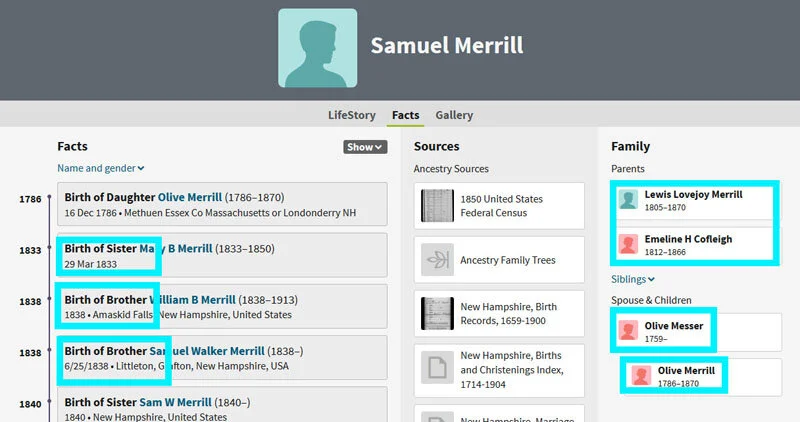
Example 1: The timeline problem
This error is so obvious I don’t know how it has been copied onto multiple trees.
In one tree, the parents of Samuel Merrill are shown as being born about 50 years after the birth of Samuel’s wife. His siblings are born decades after his children. Samuel’s parents are born after their own granddaughter.
No way.
When you see a tree like this, it’s a big red flag that someone did not do basic timeline checks.
Example 2: The record that does not fit the real life story
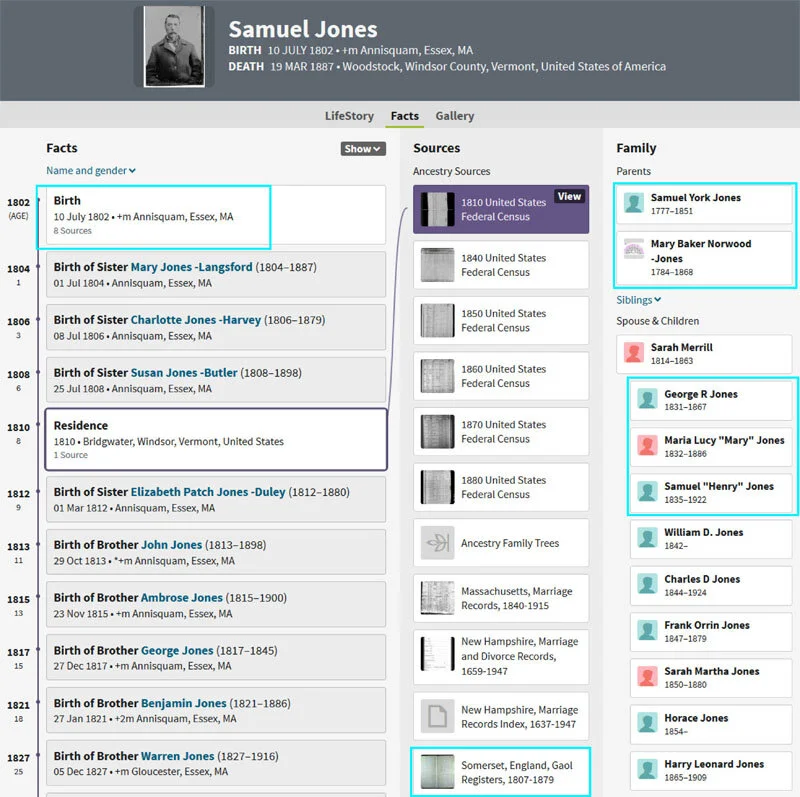
This tree is too large to show in full, but two issues stand out: the Gaol Register and the parents.
The gaol record gives an age that could fit. But the details do not.
It describes someone teaching Sunday school, having prior convictions, and being sentenced to transportation for 14 years in 1833.
My Samuel Jones married Sarah Merrill in 1831 in New Hampshire. He was poor. So how did he get to England to teach Sunday school, and why? And how did he do it while he was having children in New Hampshire?
This tree also names his parents without citations. It gives a birth a decade earlier than every record I have. That could be possible, but it is unlikely, and it is not supported.
This is exactly why I do not treat online family trees as evidence.
Related posts:
How and Why to Research Your Collateral Ancestors
12 Tips For Getting Back Focus And Motivation In Your Genealogy Research
How Setting Genealogy Goals Makes You A Better Researcher
Helpful Tools If You’re Sorting Out Online Family Trees
If you’re looking for ways to stop making online family tree mistakes and you want a clean way to track what you’ve verified, these tools pair well with the process:
Complete Family Story Organizer: Great for keeping your notes, sources, and story details together as you evaluate online family trees and rebuild lines the right way.
Genealogy Records Workbook: Helpful for tracking which record types you’ve checked for each person, especially when you are verifying someone else’s tree.
Brick Wall Breakthrough Blueprint: Useful when online trees have conflicting claims and you need a clear plan to sort evidence and choose the right next step.
If you would rather have a professional take this on, my services can help you verify a line, correct an error, and create a research plan you can trust.
Online Family Tree Mistakes: Final Thoughts
Online family trees are a good way to find clues and get started, especially when you are new to research or stuck on a brick wall. But always double-check what you find.
If you use online family trees the right way, they can lead you to records, stories, and even long-lost relatives who find you through your own tree.
And if you want a second set of eyes on a confusing line, or you want help rebuilding a shaky branch, you can browse my services and reach out. I’m happy to help you take the next step.