
How to Organize Digital Files for Genealogy So You Can Find Them Later
*This post may have affiliate links, which means I may receive commissions if you choose to purchase through links I provide (at no extra cost to you). All opinions remain my own.
You can organize digital files for genealogy by creating one main folder, sorting records by family or surname, using clear file names, and keeping source details with every document. That way, when you need that census record you downloaded six months ago, you'll know exactly where to look.
If you've been researching your family history for a while, you probably have digital records scattered across your computer. Census records in Downloads, old family photos on your desktop, and marriage certificates saved somewhere (but where?).
The good news is that you don't need expensive software or a complicated system to get organized. A few simple habits can make your genealogy research much easier to manage.
I'm Jessica, the professional genealogist behind Heritage Discovered. I help family historians organize their research, find missing records, and learn more about their ancestors. If your research has become difficult to manage, my genealogy research services can help you figure out your next steps.
Why You Need a Simple Digital Genealogy Organization System
Every record you find adds another piece to your family history. But those records aren't very helpful if you can't find them when you need them.
Without a system, you might download the same census twice, lose track of where you found a document, or spend an hour searching for a record you know you saved.
A good digital genealogy organization system should help you:
Find records quickly without searching through hundreds of files.
Keep documents connected to the correct ancestors.
Track where your information came from.
Avoid downloading or purchasing duplicate records.
Share your research with relatives more easily.
You don't have to organize everything in one weekend. Start with a small group of records and build from there.
Prefer working with paper records? My guide on how to organize genealogy files with binders explains how to sort and store physical documents. This article focuses on organizing the digital copies saved on your computer.
Choose One Main Location for Your Digital Genealogy Records
Before creating folders, decide where your genealogy files will live.
You might use a folder on your computer, an external drive, or a cloud storage service such as Google Drive, Dropbox, or OneDrive.
I recommend choosing one main location where you'll save and organize your working files. This helps prevent records from ending up in several places.
For example, create a folder called Family History Research inside your Documents folder. That’s the master folder that I set up for my own research.
Then, whenever you download a record from Ancestry, FamilySearch, or an archive, save it there instead of leaving it in Downloads.
Cloud storage can be helpful if you research on multiple devices. Just remember that syncing files isn't the same as having a separate backup.
Create a Folder Structure for Your Digital Genealogy Files
There isn't one perfect way to organize digital files. The best system is one that makes sense to you and that you'll continue using.
For genealogy research, I recommend starting with folders based on family surnames.
Here's an example:
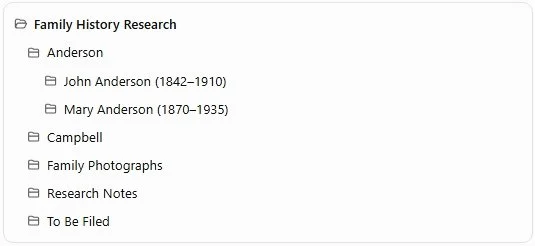
These are example names, but you can follow the same pattern with your own ancestors.
If you have a lot of records for one person, you might create smaller sub-folders for census records, vital records, land records, and other documents.
However, don't create more folders than you need. If someone only has three records, there's no reason to divide them into five categories.
If you're also sorting paper documents, read my guide on creating a genealogy file folder system. It explains how to arrange physical records in filing cabinets, while this guide covers digital folders and downloaded files.
How to Name Your Scanned and Downloaded Genealogy Records
A clear file name tells you what's inside a document before you open it.
Instead of keeping a downloaded file named image_00458.jpg, rename it with information that helps you identify the record.
I recommend including:
Ancestor's surname and first name
Year of the record
Record type
Location, if helpful
For example:
Anderson_John_1880_Census_Vermont.jpg
Or:
Campbell_Mary_1902_Marriage_Massachusetts.pdf
Using the year in a consistent position makes it easier to sort records by date.
For documents with an unknown date, use a label such as Undated rather than guessing.
And if two ancestors share the same name (which happens way too often!), add a birth year or another identifying detail to tell them apart, like Sr, son of William, or husband of Olive Messer.
Pro Tip: Avoid characters such as slashes, colons, and question marks in file names because they may cause problems on some computers.
How to Organize Digital Records That Include Multiple Family Members
Some genealogy documents belong to more than one person.
A census might list an entire household. A marriage certificate includes two people, while an obituary could mention several generations of relatives.
So where should you save them?
I recommend saving one main copy of each record and choosing a consistent rule for where it belongs.
For example:
Save census records under the head of household or family group.
Save marriage records under one designated spouse. I save it under whomever is my direct ancestor, but you can also opt to always save it under the husband or wife.
Save family photographs in a shared photograph folder.
Then use your research notes or index to reference other people named in the document.
For example, if a census lists John Anderson and his daughter Mary, you can store the record in John's folder and add a reference to it in Mary's research notes.
This keeps related information easy to find without creating unnecessary duplicate files.
Keep Source Information With Your Digital Genealogy Records
Imagine finding a marriage certificate that confirms your great-grandparents' wedding date. You download it, give it a clear name, and save it in the correct folder.
Six months later, you open the document and realize you have no idea where it came from.
That's why source information matters.
Whenever you download a genealogy record, save enough details to find the original source again.
Depending on the record, that might include:
Website or archive name
Collection title
Record date and location
Page number or record identifier
Direct link or archival reference
Date you accessed the record
You can keep these details in a research log, genealogy software, or a separate text document with the same file name. I prefer to use a running document for each ancestor, and add the information there, along with a transcription of the record.
If the website provides a source citation, save that too.
This is especially important when using online family trees. For more guidance, read my article on how to use online family trees the right way.
Create a Simple Index to Find Your Digital Genealogy Files
Once your collection grows, an index can help you locate records without opening every folder.
You can create one using Google Sheets or Excel.
Here's a simple example:
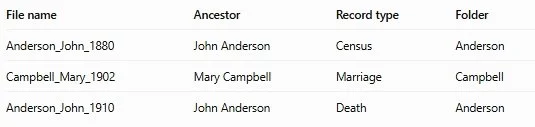
You can also add columns for source information, research notes, or other family members mentioned in each record.
A spreadsheet is especially useful when you need to organize digital files across several family lines.
If you want help keeping your wider family history research organized, my Complete Family Story Organizer is a Google Sheets workbook designed to track ancestors, family details, photographs, and research plans.
For more ideas on tracking your research, read How to Create Your Own Genealogy Tracker.
How to Handle Duplicate Digital Genealogy Records
It's easy to download the same record more than once, especially when you find it on different genealogy websites.
Before deleting anything, compare the files carefully.
Two copies of the same census page might have different image quality. One might also include handwritten notes or details missing from the other.
When reviewing duplicates:
Compare the documents to make sure they're identical.
Keep the clearest, most complete copy.
Check whether either version contains extra information.
Update your index before removing unnecessary copies.
If you find the same record in two different collections, keep track of both sources when they're useful to your research.
Don't delete files just because their names look similar. Always check their contents first.
Back Up Your Digital Genealogy Files
Organizing your records won't help much if your computer breaks and you lose everything.
That's why regular backups are so important.
One common approach is the 3-2-1 backup rule:
Keep three copies of your important files.
Store them on two different types of storage.
Keep one copy somewhere else, such as an off-site backup.
For example, you might keep your working files on your computer, another copy on an external hard drive, and a third in cloud storage.
I have two physical copies of almost everything, especially heirlooms that can’t be reordered, like letters. One lives at my house and one at my dad’s house. I also have everything on two cloud storage systems and a flash drive. I know that may seem like a lot, but I’ve spent thousands of dollars and 20 years on my research and I don’t want to risk it.
You can learn more about digital preservation from the Library of Congress.
Remember to check your backups occasionally to make sure you can actually open the files.
Have original family letters you've scanned? Digital backups help protect their contents, but the paper originals still need proper care. Read my guide on how to preserve and protect old letters for safe handling, storage supplies, and preservation tips.
Keep Your Digital Genealogy Records Organized as Your Research Grows
Once you've created your system, the next step is keeping up with it.
I recommend setting aside a few minutes after each research session to:
Rename newly downloaded records.
Move files into their correct folders.
Add source details to your research notes.
Update your index when needed.
Back up any new documents.
You can also keep a temporary “To Be Filed” folder for records you haven't had time to organize. Just make sure to empty it regularly (otherwise, you've created another messy Downloads folder!).
If you're working through years of old files, don't feel like you need to sort everything at once. Choose one family line and work through those records first.
For more ways to manage your research tasks, check out my article on organizing your genealogy to-do list.

Start Organizing Your Digital Genealogy Files Today
You don't need to reorganize your entire family history collection this week.
Start with one folder, choose a file-naming system, and organize a few records. Once you've found a method that works, use it for each new document you save.
When you organize digital files consistently, you'll spend less time searching through your computer and more time researching your ancestors.
And if you've collected plenty of records but aren't sure what to research next, I'd love to help. At Heritage Discovered, I offer personalized genealogy research services to help you find records, work through research questions, and continue exploring your family history.
Visit Heritage Discovered to learn about my services and schedule a free 20-minute consultation.